
PipePulse
Supercharge your Moen Flo
An independent companion app for Moen Flo water devices. It shows more of what your devices already measure: long-term history, clearer charts and the technical details.

Before using PipePulse, first set up your Moen Flo devices and account in the official Moen Flo app.
What you get
Deeper insights from your Moen Flo devices.
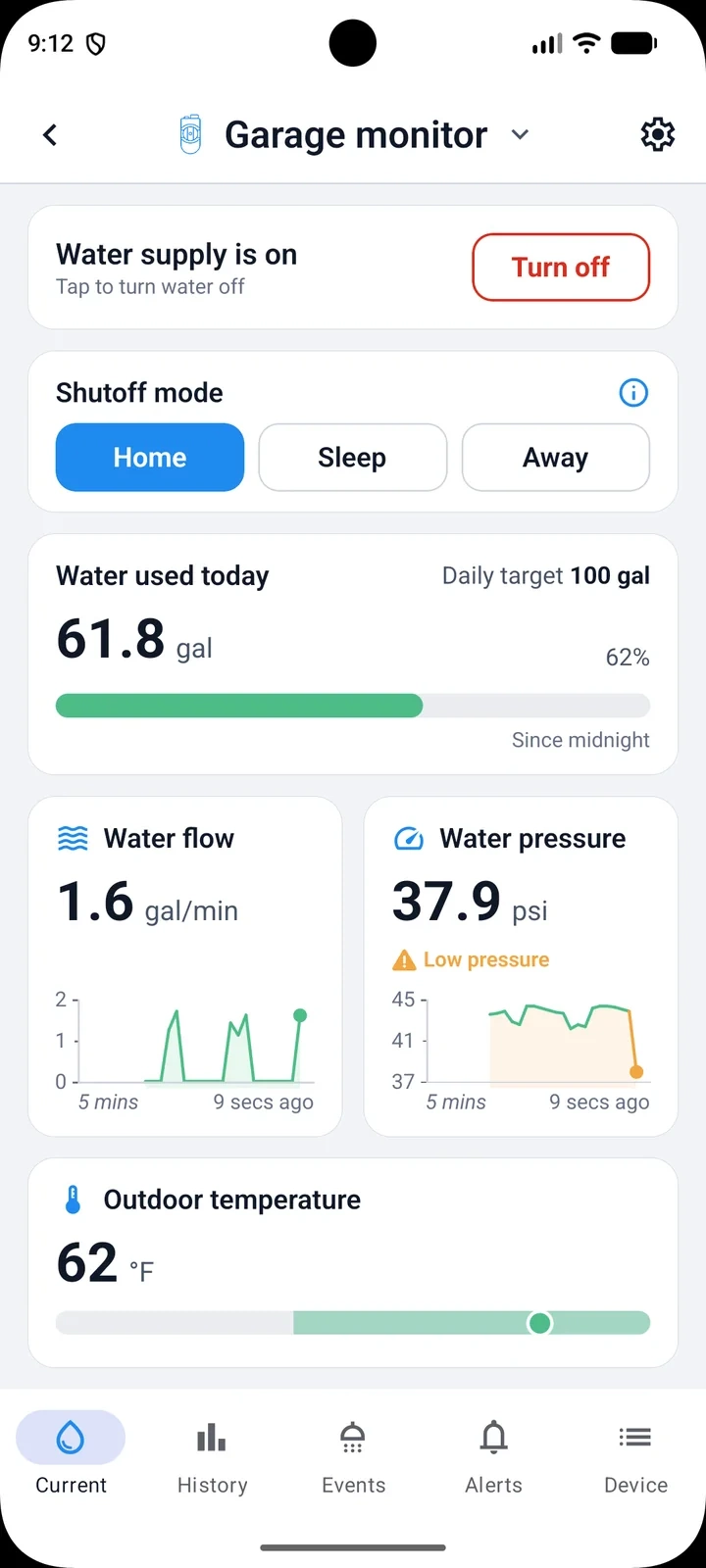
Live readings
Water flow and pressure, updated every 10 seconds.
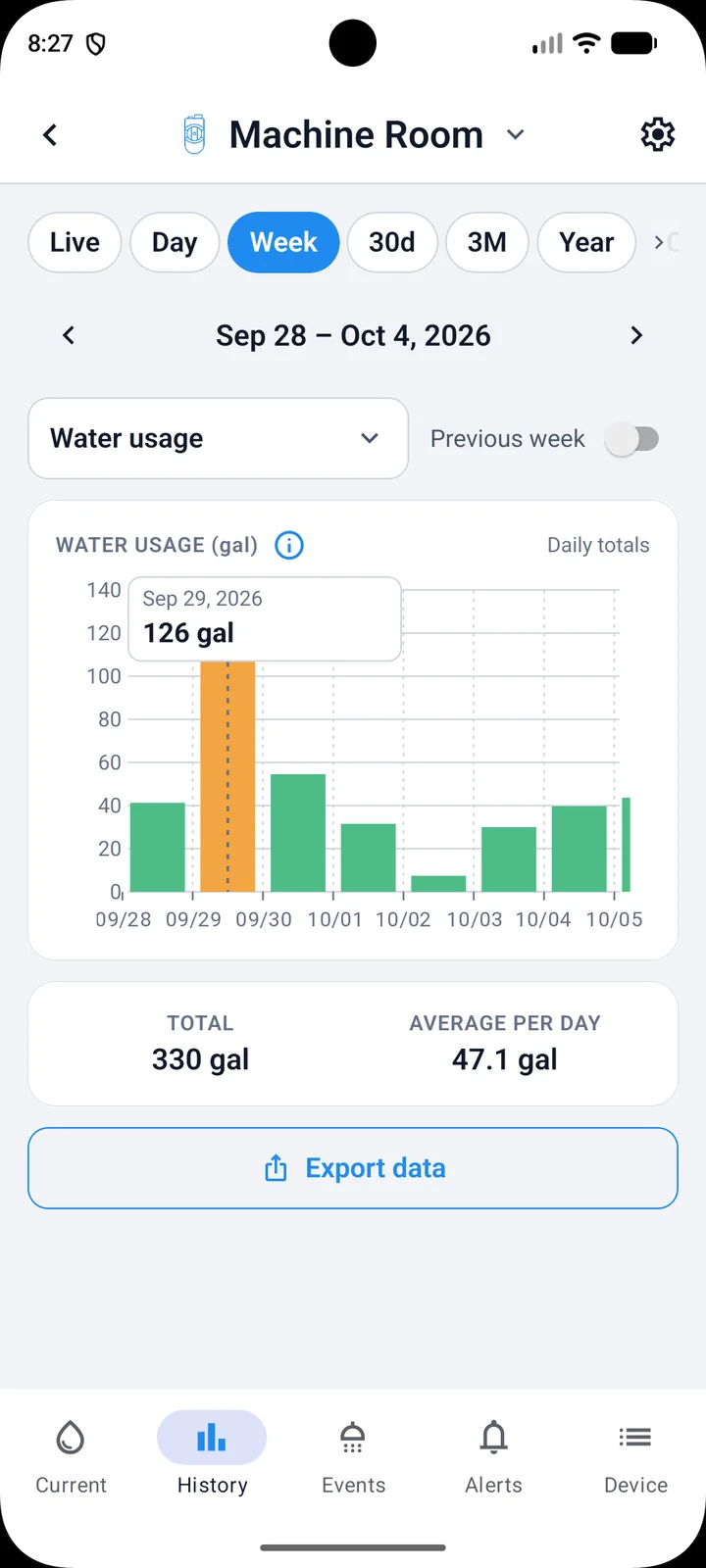
Long-term device history
Track all metrics over time: by day, week, 30 days, 3 months, year or a custom range. Your history keeps growing on your phone, with no limit.
Compare periods
See this week, month or year next to the one before.
Visual alerts
Color-coded indicators for values outside recommended standards.
Water-use events
What used water, when and how much.
Technical diagnostics
Deep insight into device performance.
Export
Save your readings and events as a file.
Try before signing in
Take a tour of the demo offered on the sign-in screen, which opens the app with built-in sample data. Nothing is sent to a real device.
A look inside
Water use, flow and pressure charts.
Screens using the app's demo data. Select one to enlarge it.
Good to know
A companion to the Moen Flo app.
Supported devices
Works with the Moen Flo™ Smart Water Monitor and Shutoff, and the Moen Flo™ Smart Water Detector. Other Moen Flo devices on your account might be listed, but are not supported yet.
Use it alongside the Moen Flo app
PipePulse does not replace the official Moen Flo app. Set up devices, change their settings and manage your Moen Flo account there. PipePulse reads from Moen's service; it can also turn the water supply on or off and change the names of your devices and homes. See also what Moen shows and how PipePulse keeps a longer history.
Signing in
You sign in with the same email and password as in the Moen Flo app. Your login information is saved securely on your device and sent only to Moen to log you in.
Your data
Your history is stored on your phone, so charts open quickly and keep working without a connection. Nothing is sold or shared for advertising. See the Privacy Policy for details.
Price and languages
Free. If paid features are added later, the first month will be free. Available in English and French.
Independent app
This is an unofficial, third-party app and is not affiliated with Moen.
Not a safety system
PipePulse is an information tool. Do not rely on it alone to detect leaks or protect your home; keep the alerts of the official Moen Flo app turned on.
Questions
PipePulse and Moen Flo: frequently asked questions.
Where can I get PipePulse?
PipePulse is available on the App Store for iPhone and on Google Play for Android. To use it with a real device you need at least one supported Moen Flo™ device on your account: the Smart Water Monitor and Shutoff or the Smart Water Detector. You can also try the demo included in the app, which uses sample data.
How is PipePulse different from the Moen Flo app?
The official Moen Flo app is where you set up and control your devices, manage your account and get alerts. PipePulse is a companion for deeper insights: it keeps a long-term history on your phone and turns it into detailed charts of flow, pressure, water use, temperature, humidity and battery, with period comparisons and technical diagnostics. Most people use both. Read more in how to see your Moen Flo water-use history, and keep more of it.
Do I still need the Moen Flo app?
Yes. PipePulse does not replace the official Moen Flo app. Set up devices, change their settings and manage your Moen Flo account there, and keep its alerts turned on.
How much history does PipePulse keep?
There is no limit. PipePulse saves your readings on your phone and the history keeps growing for as long as you use it. Open PipePulse at least once a month so it can catch up with your latest readings without gaps.
Can I track my water pressure over time?
Yes. PipePulse charts water pressure and flow hour by hour and over weeks, months or a year, and colors values outside recommended ranges, so you can spot changes that are hard to see day to day.
Can I export my Moen Flo data?
Yes. PipePulse can save your readings and water-use events as a file.
Which devices does it work with?
The Moen Flo™ Smart Water Monitor and Shutoff, and the Moen Flo™ Smart Water Detector. Other Moen Flo devices on your account might be listed, but are not supported yet.
Which languages does PipePulse support?
English and French.
How do I sign in?
With the same email and password as in the Moen Flo app. Your login information is saved securely on your device and sent only to Moen to log you in.
Can PipePulse change anything on my devices?
PipePulse reads from Moen's service, and supports some actions, including turning the water supply on or off and changing the names of your devices and homes.
Can I try it without a Moen account?
Yes. The sign-in screen offers a demo that opens the app with built-in sample data. Nothing is sent to a real device.
What does it cost?
PipePulse is free. If paid features are added later, the first month will be free.
Is PipePulse made by Moen?
No. PipePulse is an unofficial, third-party app made by Iron Apps. It is not affiliated with Moen.
Get PipePulse
Free on iPhone and Android, in English and French.